

- Technical specifications of MDflasher modules
- MDflasher Support
- In the new version of MDflasher for Windows 10/11, an activation code is no longer required — the module activates online after restarting the program. If you are using Windows 7, please specify in the order comments that you need an activation code.
License 77 GM ACDelco E67/E87 ECU BENCH/OBDII for MDflasher
The GM ACDelco E67/E87 ECU BENCH/OBDII license is designed for professional work with ACDelco E67 and ACDelco E87 engine control units. It provides full functionality for diagnostics, reading, writing, and data recovery both via OBDII and on the bench (Bench/Recovery modes). Ideal for service centers, chip tuning, repair, and ECU restoration.
To activate the module you need a USB dongle MDflasher. When ordering, please indicate the Serial Number of the key.
Main functions
OBDII Mode — On-Vehicle Operation (E67/E87)
OBDII mode enables safe access to the ECU through the vehicle’s diagnostic connector without removing the unit. Supported functions:
- Reading ECU identification
- Reading diagnostic trouble codes (DTC)
- Clearing DTCs
- Reading Flash memory
- Writing calibration area without checksum correction
This mode allows performing calibration and service operations directly on the vehicle.
Bench Mode — Off-Vehicle/Bench Operation (E67/E87)
Bench mode provides direct access to the ECU memory with maximum stability and data exchange speed. Supported operations:
- Flash reading
- Full Flash writing without checksum correction
- EEPROM reading
- EEPROM writing
Bench Mode is recommended for chip tuning, deep repair, and recovering ECUs after write errors or corrupted firmware.
Recovery Mode — ECU Recovery on the Bench (E87)
Recovery Mode is used to restore “bricked” E87 units after a faulty flash or write failure. Supported functions:
- Flash reading
- Flash writing without CRC recalculation
- EEPROM reading
- EEPROM writing
This mode provides low-level access to memory, giving the highest chance of restoring ECU operability.
EEPROM Editor for E87
The integrated EEPROM editor provides extended configuration capabilities:
- Odometer value correction
- Setting the ECU to “new” state for adaptation to another vehicle
These features simplify ECU replacement, adaptation, and restoration.
Note: Not all software versions may be supported. Please verify compatibility with the specific ECU version before use.
Open the program and click “Settings” -> “Number key”
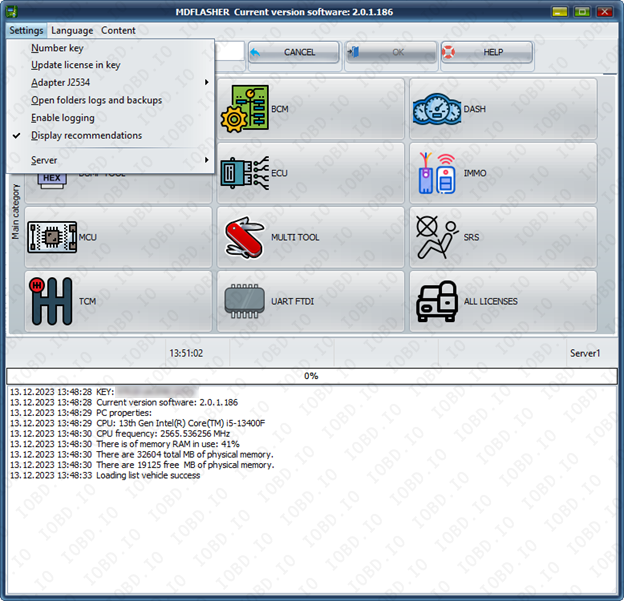
Click “OK” and click ok and your key number will be copied.

In the new version of MDflasher for Windows 10/11, an activation code is no longer required — the module activates online after restarting the program.
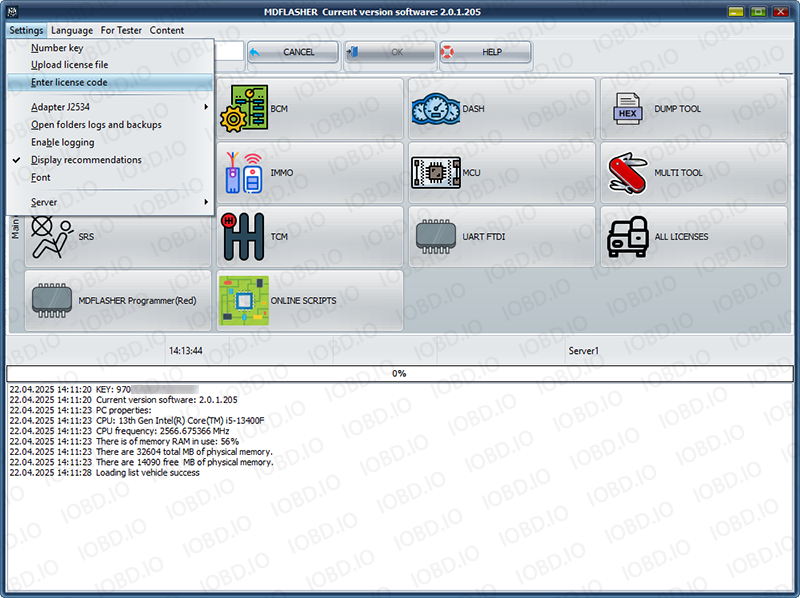
If you are using Windows 7 after receiving the activation code, click "Enter lecense code" and paste the activation code into the field. After that, restart the program.
1. No Refunds or Modifications for Digital Licenses
Activated modules or licenses cannot be returned or refunded.
If an incorrect key or device number is entered by the customer, the purchase is not eligible for return.
Licenses cannot be modified, transferred, or reissued for another device under any circumstances.
2. Irreversible Order Processing
After the order status changes to “Waiting for activation”, the data has already been sent to the developer.
From this point onward, the order cannot be canceled, edited, corrected, or refunded.
3. Responsibility for Software Functionality
Our store is not responsible for the functionality, performance, or declared features of any software module.
We do not guarantee the listed functions because we are not the developer.
4. Accuracy of Product Information
Module and script descriptions are provided directly by the manufacturer.
IOBD.io is not responsible for any inaccuracies, missing details, or differences between the description and actual operation.
In disputed situations regarding functionality or listed features, the customer must contact the manufacturer.
5. Customer Responsibility for Installation
IOBD.io sells professional automotive diagnostic software and equipment.
Installation, setup, configuration, and compatibility checks must be performed by the customer.
We do not provide remote installation, programming, or setup services unless explicitly stated otherwise.
6. Required Technical Knowledge
These products are intended for users with basic technical knowledge in automotive diagnostics.
The customer is fully responsible for understanding the installation process and using the software and hardware correctly.
7. No Liability for Incorrect Usage
IOBD.IO is not responsible for issues caused by:
incorrect installation
unsupported or incompatible hardware
improper configuration
third-party interference
 In stock
License 73. GAZ/VAZ M12/M12.48/M74.5/M75(KLINE) M86(CAN) PETROL ECU BENCH/OBDII (MDflasher)
In stock
License 73. GAZ/VAZ M12/M12.48/M74.5/M75(KLINE) M86(CAN) PETROL ECU BENCH/OBDII (MDflasher)
$89.00