Menu
Cart 0$0.00
    Messenger support
    IOBD - Tools & software for cars
    Cart 0$0.00
    Search
    • About Us
      • About Us
      • Privacy Policy
      • Terms & Conditions
      • Returns & Refunds policy
      • Delivery Policy
    • Blog
    • News
    • Contact
    • Special
    • SUPPORT
      • WhatsApp support
      • Telegram support
    • AED
    • EUR
    • USD
    IOBD - Tools & software for cars
    Cart 0$0.00
    Cart
    Your shopping cart is empty!
    • Diagnostic
      • Car scanners
        • Cars
        • Motorcycles
        • Electric cars
      • J2534 adapters
      • Programmers
        • iProg programmer and accessories
        • Licenses and Accessories for Orange 5
        • Modules and accessories GromCalcTool
        • Scripts for UPA-USB programmer
        • Programmers
        • Accessories for programmers
        • Licenses and accessories for Abrites programmers
      • CAN-Hacker – CAN & LIN analyzers
      • Adapters
    • Chip tuning
      • Universal devices
      • Loaders, flashers
        • PCMflash
        • Combiloader
        • BitBox
        • MMC flash
        • MDflasher
        • Mitsubishi ECU flasher
      • Firmware editors
        • BOOTMOD3
        • iProg calculator
        • ChipTuningPro
        • BitEdit
        • ECULite
        • SVEdit
        • ProByte Edit
        • VAG IMMO Calculator
      • J2534 adapters
      • Cables and adapters
      • Wireless adapters
      • Acceleration dynamics measuring
    • Car keys
      • Programmers
        • Accessories for programmers
    • ODO/SRS
      • Programmers
      • MDflasher
      • STool
      • Gromcalc / Probyte
      • iProg Pro
        • Programmer and adapters
        • iProg scripts
        • iProg calculators
    • Software
      • BitBox
      • BitEdit
      • Calculators for iProgGuard and iProgPro
      • CAN-Hacker
      • ChipTuningPro
      • Combiloader
      • ECULite
      • Flex
      • FORScan
      • Gprog
      • GProg Pro SE
      • iProg scripts
        • Dashboard
        • SRS
        • IMMO / Key
        • ECU / BCM / ...
        • MCU / Flash / EEPROM
        • Car radio
        • Synchronization
        • Angle sensor
        • Conversation
        • Other
      • MDflasher
      • Mitsubishi ECU flasher
      • MMC flash
      • OBDstar
      • Other software
      • PCMflash
      • Poldiag
      • ProByte
      • ProByte Edit
      • STool
      • SVEdit
      • ThinkCar
      • UCDS
      • UPA scripts
        • Dashboard
        • ECU
        • Other
        • SAS
        • SRS
        • Packages and updates
      • VAG IMMO Calculator
      • VCTS (VolvoCarTool)
      • Xtool
    • Diagnostic
      • Car scanners
        • Cars
        • Motorcycles
        • Electric cars
      • J2534 adapters
      • Programmers
        • iProg programmer and accessories
        • Licenses and Accessories for Orange 5
        • Modules and accessories GromCalcTool
        • Scripts for UPA-USB programmer
        • Programmers
        • Accessories for programmers
        • Licenses and accessories for Abrites programmers
      • CAN-Hacker – CAN & LIN analyzers
      • Adapters
    • Chip tuning
      • Universal devices
      • Loaders, flashers
        • PCMflash
        • Combiloader
        • BitBox
        • MMC flash
        • MDflasher
        • Mitsubishi ECU flasher
      • Firmware editors
        • BOOTMOD3
        • iProg calculator
        • ChipTuningPro
        • BitEdit
        • ECULite
        • SVEdit
        • ProByte Edit
        • VAG IMMO Calculator
      • J2534 adapters
      • Cables and adapters
      • Wireless adapters
      • Acceleration dynamics measuring
    • ODO/SRS
      • Programmers
      • MDflasher
      • STool
      • Gromcalc / Probyte
      • iProg Pro
        • Programmer and adapters
        • iProg scripts
        • iProg calculators
    • Software
      • BitBox
      • BitEdit
      • Calculators for iProgGuard and iProgPro
      • CAN-Hacker
      • ChipTuningPro
      • Combiloader
      • ECULite
      • Flex
      • FORScan
      • Gprog
      • GProg Pro SE
      • iProg scripts
        • Dashboard
        • SRS
        • IMMO / Key
        • ECU / BCM / ...
        • MCU / Flash / EEPROM
        • Car radio
        • Synchronization
        • Angle sensor
        • Conversation
        • Other
      • MDflasher
      • Mitsubishi ECU flasher
      • MMC flash
      • OBDstar
      • Other software
      • PCMflash
      • Poldiag
      • ProByte
      • ProByte Edit
      • STool
      • SVEdit
      • ThinkCar
      • UCDS
      • UPA scripts
        • Dashboard
        • ECU
        • Other
        • SAS
        • SRS
        • Packages and updates
      • VAG IMMO Calculator
      • VCTS (VolvoCarTool)
      • Xtool
    • Manufacturer
    • WhatsApp
    • Email
    • Telegram
    Authorization
    Forgot your password?
    Register

    How to Install and Configure the ELS27 V5 Wireless Adapter

    • Home
    • Blog
    • ELS27 V5 Wi-Fi & Bluetooth Adapter Guide
    How to Install and Configure the ELS27 V5 Wireless Adapter
    • 663
    • 7 October, 2025

    ELS27 V5 Wireless User Guide (Firmware V1.0.0)

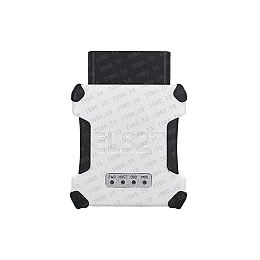
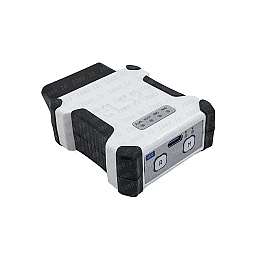
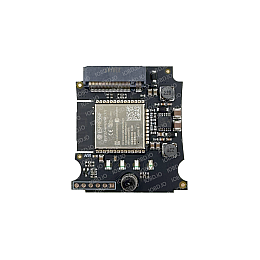
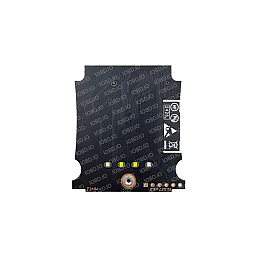
    ELS27 V5 adapters can be supplied with a wireless module pre-installed, or the module can be added later as an upgrade.

    The module comes with an M2 screw for securing the adapter’s processor board. Depending on the kit, the screw head may be flat-slot, Phillips, or Torx.

    To install the module:

    • Use a 2 mm hex key (H2) to remove the four screws holding the adapter case.
    • Holding the bottom half, lift off the top cover.
    • Remove the two self-tapping screws with a Phillips screwdriver.
    • Separate the processor board from the interface board.
    • Insert the processor board into the slot on the wireless module and secure it with the M2 screw.
    • Reassemble the adapter in reverse order.


    Operating Modes

    The module supports three primary modes:

    • Wi-Fi Access Point (AP)
    • Wi-Fi Client
    • Bluetooth SPP (Serial Port Profile)

    iOS devices work via Wi-Fi.

    Android devices and Windows PCs work via Wi-Fi and Bluetooth.

    Tip: When connected to the adapter in Wi-Fi AP mode, your device may lose internet access. We recommend Wi-Fi Client mode or Bluetooth to keep internet connectivity.

    Control & Configuration

    Factory defaults:

    On first power-up, the module starts a Wi-Fi access point with:

    • SSID: ELS27
    • Password: ELS27.RU

    In this state the adapter is ready for Wi-Fi use. In your diagnostic software, set the host to els27.local or the direct IP 192.168.4.1, port 35000.

    (Note: 192.168.4.1 is valid only in AP mode.)

    After connecting to the AP, a setup page should open automatically. If not, open it manually:

    • http://els27.local/ or
    • http://192.168.4.1/

    On the network setup page you can select a discovered network or enter the SSID manually. Enter the Wi-Fi password. These settings are for connecting the adapter as a client to your Wi-Fi router or to a phone hotspot.

    After saving and exiting the web UI, the adapter will connect to the selected network and be available at http://els27.local/ (or at the DHCP-assigned IP of your network).

    In your diagnostic software, specify the adapter’s IP address and port 35000.

    Note: In Client mode, the IP address is assigned dynamically by your router’s DHCP and may change.

    Switching modes:

    Press the M button briefly to toggle between Wi-Fi and Bluetooth modes.

    If Wi-Fi is active, hold M for >5 seconds to start the AP with SSID ELS27 and password ELS27.RU (same as initial setup). If Client mode is already configured, the module will operate both as Client and AP in parallel.

    Bluetooth pairing:

    • Uses the SPP profile with simplified pairing.
    • Pair once via your device’s OS (Android/Windows) before first use.

    Factory reset:

    • Hold the R button for >5 seconds. The PWR LED will blink rapidly.
    • The wireless module and the adapter return to factory defaults.

    Firmware Update

    When new firmware versions are released, update via the web interface: http://els27.local/update
    663
    7 October, 2025
    Recommended
    Popular Bestseller Will end soon Points: 1
    ELS27 version 5.0
    ELS27 version 5.0
    ELS27 version 5.0
    ELS27 version 5.0
    In stock ELS27 version 5.0

    $147.00

    Popular Bestseller
    Wireless module for the ELS27 V5
    Wireless module for the ELS27 V5
    In stock Wireless module for the ELS27 V5

    $29.87

    Please select required options

    IOBD.IO

    2025

    Diagnostics
    • Diagnostic
    • Car scanners
    • Programmers
    • CAN-Hacker – CAN & LIN analyzers
    Flashers
    • Loaders, flashers
    • PCMflash
    • BitBox
    • MMC flash
    • MDflasher
    • Combiloader
    Firmware editors
    • Firmware editors
    • BitEdit
    • ChipTuningPro
    • SVEdit
    • ECULite
    J2534 adapters
    • J2534 adapters
    • Cables and adapters
    About company
    • About Us
    • Privacy Policy
    • Terms & Conditions
    • Manufacturer
    • Delivery Policy
    • Contact
    Support

    10:00–23:00 (GMT+4)

    We’re online
    • Telegram
    • WhatsApp
    • Instagram

    IOBD.IO, 2025

    • visa
    • Mastercard
    • Apple Pay
    • Google Pay
    • PayPal
    • TRC20