
- Scripts work only with original devices iProg Pro
-
Processing Time: From a few hours up to several days.
Scripts are created individually by different third-party developers, so fulfillment speed depends directly on their current workload.
VAG SRS TRW Crash Count Reset CAN Script for iProg Pro – Airbag Reset & B2000 Error Fix
The VAG SRS TRW Crash Count Reset CAN Script for the iProg Pro programmer is a highly effective tool engineered for diagnostics, comprehensive Crash Data removal, and software repair of TRW Airbag ECUs (VW20 and VW21 platforms).
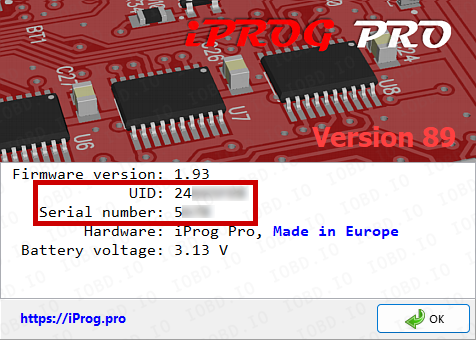
The script only works with original iProg Pro programmer! Please write Serial Number and UID in the order.
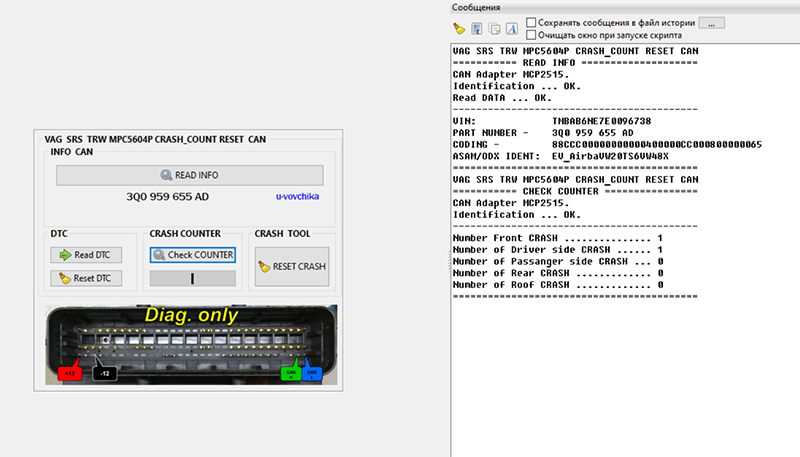
This module fully supports advanced, next-generation microcontrollers including NXP/Freescale MPC5604P and Renesas RH850 found in modern Volkswagen, Audi, Skoda, and Seat models. All communication is securely handled over a high-speed CAN-bus interface.
Key Features & Capabilities
- ECU Identification: Instantly read part numbers, hardware/software versions, and active coding.
- Read & Clear Fault Codes (DTCs): Comprehensive code clearance inside the SRS system.
- Live Impact Diagnostics: Extract specific parameters and details regarding recorded collisions directly from the module's live data.
- Crash Data & Counter Reset: Wipe the deployment history and reset impact counters to factory standards.
- B2000 Error Eraser: Safely removes the critical, unerasable "Internal Control Module Memory Error" (B2000 DTC), provided the issue is software-related and not caused by component hardware failure
Supported TRW SRS Module List:
The script is fully optimized for the popular 3Q0 959 655 ECU series, supporting modifications such as:
- 3Q0 959 655 AC
- 3Q0 959 655 AS
- 3Q0 959 655 AT
- 3Q0 959 655 BA
- 3Q0 959 655 BB
- 3Q0 959 655 BC
- 3Q0 959 655 BD
- 3Q0 959 655 BE
- 3Q0 959 655 BF
- 3Q0 959 655 P
- 3Q0 959 655 Q
- 3Q0 959 655 R
- 3Q0 959 655 S
- 3Q0 959 655 A
- 3Q0 959 655 B
- 3Q0 959 655 D
- 3Q0 959 655 E
- 3Q0 959 655 G
- 3Q0 959 655 J
- 3Q0 959 655 K
- 3Q0 959 655 L
- 3Q0 959 655 BL
- 3Q0 959 655 CQ
- 3Q0 959 655 CM
- 3Q0 959 655 DB
- 3Q0 959 655 DM
Why Upgrade Your Workshop with This Tool?
There is no longer a need to desolder microprocessors or trace complex JTAG connections for standard reset jobs—the critical actions are handled efficiently via CAN lines. Additionally, fixing the notorious B2000 software bug saves your clients from expensive module replacements, boosting your shop’s revenue and reputation.
Open the program and click “Help” -> “About”.
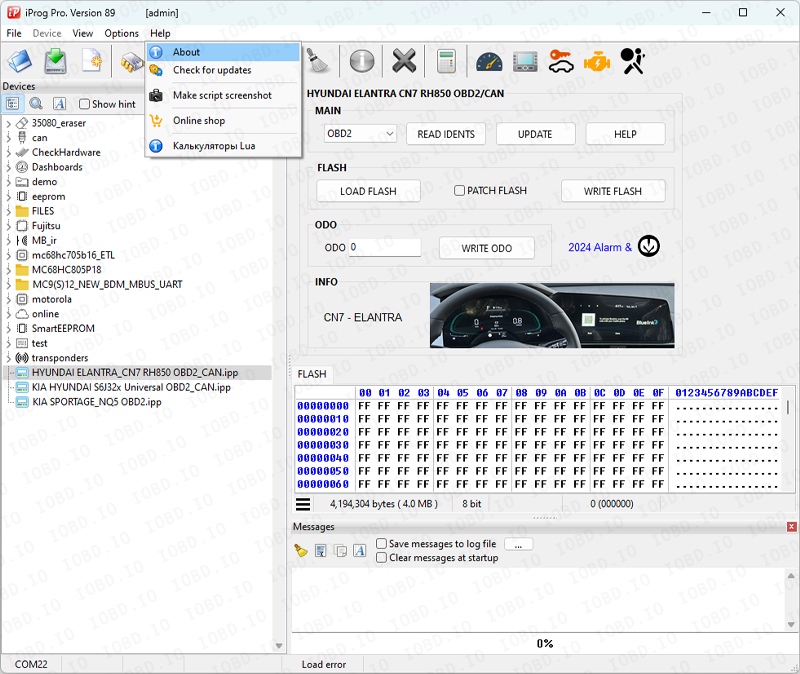
Copy data from the program when placing an order
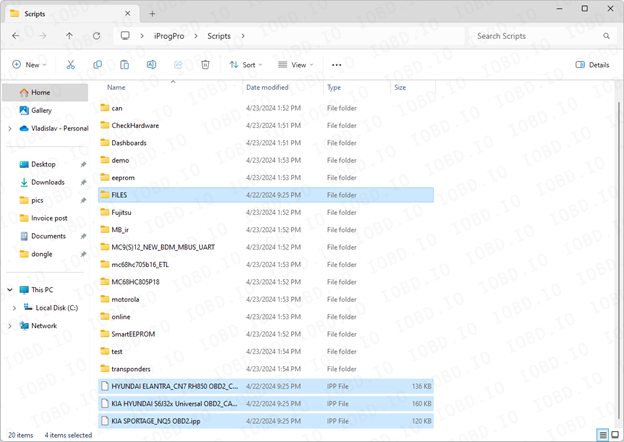
After completing the order, you will receive files, they must be added to the Scripts folder..
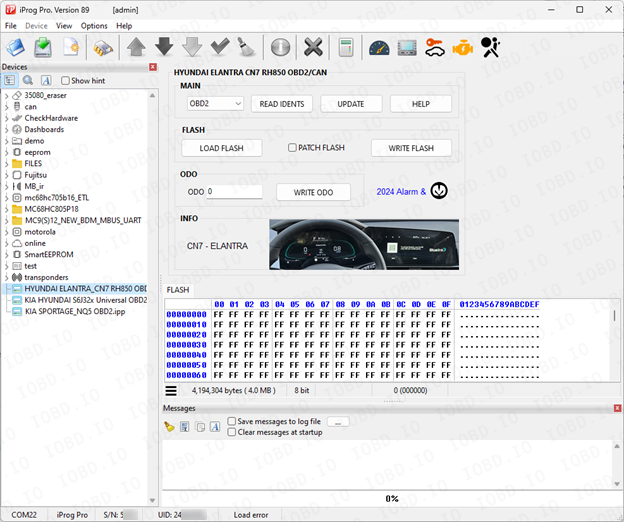
Launch the program and on the left side of the screen you will see the added scripts.
1. No Refunds or Modifications for Digital Licenses
Activated modules or licenses cannot be returned or refunded.
If an incorrect key or device number is entered by the customer, the purchase is not eligible for return.
Licenses cannot be modified, transferred, or reissued for another device under any circumstances.
2. Irreversible Order Processing
After the order status changes to “Waiting for activation”, the data has already been sent to the developer.
From this point onward, the order cannot be canceled, edited, corrected, or refunded.
3. Responsibility for Software Functionality
Our store is not responsible for the functionality, performance, or declared features of any software module.
We do not guarantee the listed functions because we are not the developer.
4. Accuracy of Product Information
Module and script descriptions are provided directly by the manufacturer.
IOBD.io is not responsible for any inaccuracies, missing details, or differences between the description and actual operation.
In disputed situations regarding functionality or listed features, the customer must contact the manufacturer.
5. Customer Responsibility for Installation
IOBD.io sells professional automotive diagnostic software and equipment.
Installation, setup, configuration, and compatibility checks must be performed by the customer.
We do not provide remote installation, programming, or setup services unless explicitly stated otherwise.
6. Required Technical Knowledge
These products are intended for users with basic technical knowledge in automotive diagnostics.
The customer is fully responsible for understanding the installation process and using the software and hardware correctly.
7. No Liability for Incorrect Usage
IOBD.IO is not responsible for issues caused by:
incorrect installation
unsupported or incompatible hardware
improper configuration
third-party interference