


- Scripts work only with original devices iProg Pro
-
Processing Time: From a few hours up to several days.
Scripts are created individually by different third-party developers, so fulfillment speed depends directly on their current workload.
Script Renesas RH850 Locked (UART) for reading and writing, it does not have built-in calculators
ATTENTION!!! Script only for professional use!!! This means that you must understand what you are doing and what result you want to achieve. If you have insufficient level, then please do not buy this script, to later ask questions how to use it. The script does not contain calculators.
The script only works with the original devices and iProg software.
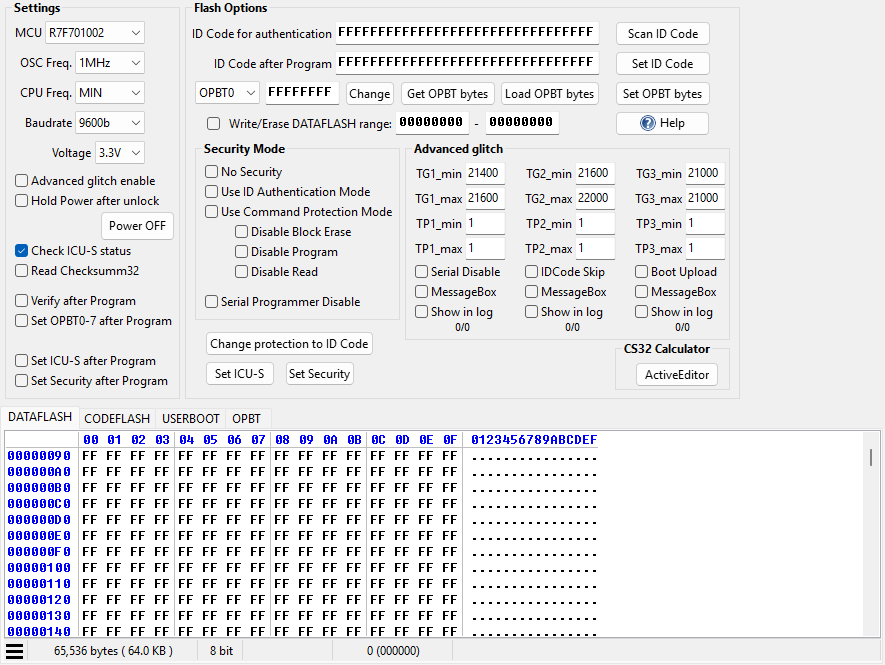
Supported processors
- R7F701002
- R7F701003
- R7F701006
- R7F701007
- R7F701008
- R7F701009
- R7F701010
- R7F701011
- R7F701012
- R7F701013
- R7F701014
- R7F701015
- R7F701016
- R7F701017
- R7F701018
- R7F701019
- R7F701020
- R7F701021
- R7F701022
- R7F701023
- R7F701024
- R7F701025
- R7F701026
- R7F701027
- R7F701028
- R7F701029
- R7F701030
- R7F701032
- R7F701033
- R7F701034
- R7F701040
- R7F701041
- R7F701042
- R7F701043
- R7F701044
- R7F701045
- R7F701046
- R7F701047
- R7F701048
- R7F701049
- R7F701050
- R7F701051
- R7F701052
- R7F701053
- R7F701054
- R7F701055
- R7F701056
- R7F701057
- R7F701062
- R7F701064
- R7F701067
- R7F701069
- R7F701071
- R7F701201
- R7F701202
- R7F701204
- R7F701205
- R7F701215
- R7F701216
- R7F701400
- R7F701401
- R7F701402
- R7F701403
- R7F701404
- R7F701405
- R7F701406
- R7F701407
- R7F701408
- R7F701410
- R7F701411
- R7F701412
- R7F701414
- R7F701416
- R7F701417
- R7F701418
- R7F701421
- R7F701422
- R7F701423
- R7F701428
- R7F701430
- R7F701431
- R7F701432
- R7F701434
- R7F701437
- R7F701438
- R7F701441
- R7F701442
- R7F701461
- R7F701462
- R7F701542
- R7F701543
- R7F701544
- R7F701545
- R7F701546
- R7F701547
- R7F701548
- R7F701549
- R7F701552
- R7F701553
- R7F701557
- R7F701560
- R7F701561
- R7F701562
- R7F701563
- R7F701564
- R7F701565
- R7F701566
- R7F701567
- R7F701568
- R7F701569
- R7F701572
- R7F701573
- R7F701577
- R7F701580
- R7F701581
- R7F701582
- R7F701583
- R7F701586
- R7F701587
- R7F701589
- R7F701597
- R7F701602
- R7F701603
- R7F701610
- R7F701611
- R7F701612
- R7F701613
- R7F701620
- R7F701621
- R7F701622
- R7F701623
- R7F701644
- R7F701645
- R7F701646
- R7F701647
- R7F701648
- R7F701649
- R7F701650
- R7F701651
- R7F701652
- R7F701653
- R7F701684
- R7F701685
- R7F701686
- R7F701687
- R7F701688
- R7F701689
- R7F701690
- R7F701691
- R7F701692
- R7F701693
- R7F701694
- R7F701695
- R7F701A03
- R7F701A22
- R7F701A31
- R7F701A33
- R7F701A35
- R7F701A38
- R7F701A40
- R7F701A43
If you are used to "press button - mileage changes" then this script is not for you. It will not have colorful pictures of boards with connections and calculators, you must find the necessary points yourself and connect to them based on the help file with processor pinouts.
In some cases, you will have to use an oscillator or a logic analyzer to check the process and adjust the script operation.
If you are still not scared, and looking forward to making new cars MB, Toyota and so on with closed processors, then you can buy this module
Main features of the script:
Script allows to read/write DataFlash processor in 4-byte mode. As you already know, in many cases when reading RH850 and recording the dhow back counted, instrument panels or other units stopped working normally. Now with this mode you can easily write what was not possible before.
Of course, there are some RH850 that do not support this mode, so for such processors reading occurs at 16 bytes. ATTENTION! If DataFlash is read in 16Bytes mode, then write it back at your own risk!
Script allows reading both open and closed (Locked) processors. With open I think everything is clear and not much to tell. Read - erased - recorded.
With closed processors, it’s a lot more complicated. In RH850 several types of protection: No Security (without protection), ID Code protection (16-byte password protection), Command Protection Read/Write/Erase (protection from Read/Write/Erase).
In addition, the protection of Serial Programmer Disable (Ban on working with the programmer) can be installed.
Script allows to bypass the single protection Serial Programmer Disable and ID Code protection. So, if you have both Serial Programmer Disable and ID Code protection, then
You must know the ID Code
In case of single protection by ID Code (which you naturally don’t know) the script allows to read but write and erase will be unavailable without known ID Code.
See questions about VAG group, which has Command Protection. The answer is short: who understands what to do will read and write.
The script also determines the state of ICU-S (enable/disable). A little information about ICU-S can be read here.
The script does not encrypt the dumps, it keeps in a normal form.
The circuit of the adapter for operation will be given after purchase.
Video of the script:
Read/write processor with protection installed Serial Programmer Disable
Open the program and click “Help” -> “About”.
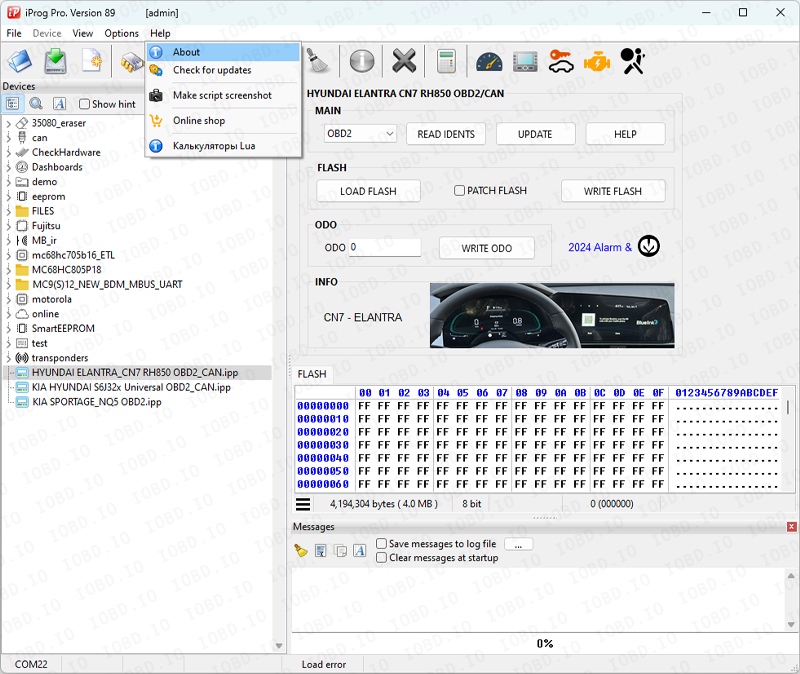
Copy data from the program when placing an order
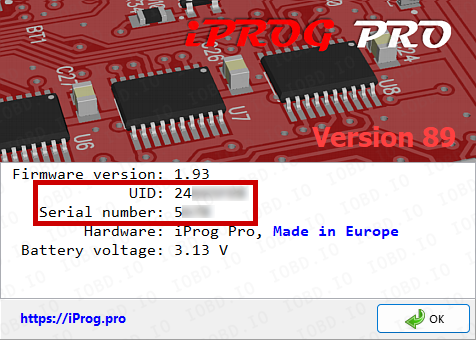
After completing the order, you will receive files, they must be added to the Scripts folder..
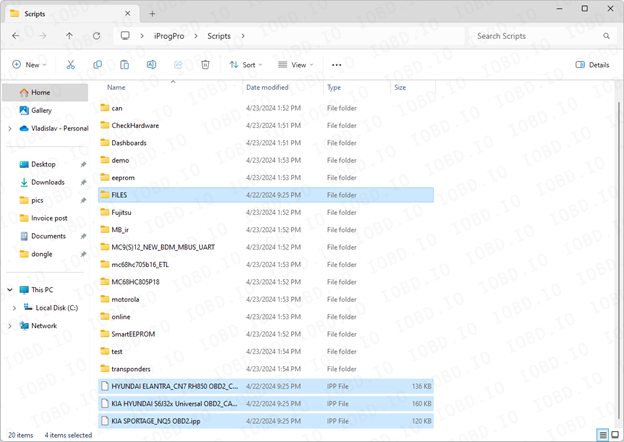
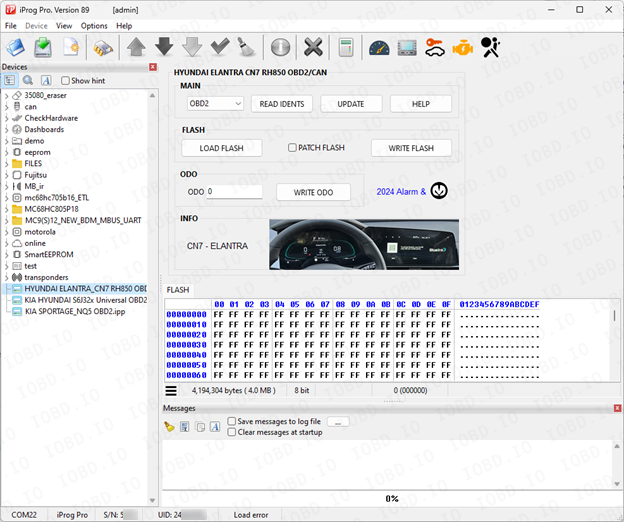
Launch the program and on the left side of the screen you will see the added scripts.
1. No Refunds or Modifications for Digital Licenses
Activated modules or licenses cannot be returned or refunded.
If an incorrect key or device number is entered by the customer, the purchase is not eligible for return.
Licenses cannot be modified, transferred, or reissued for another device under any circumstances.
2. Irreversible Order Processing
After the order status changes to “Waiting for activation”, the data has already been sent to the developer.
From this point onward, the order cannot be canceled, edited, corrected, or refunded.
3. Responsibility for Software Functionality
Our store is not responsible for the functionality, performance, or declared features of any software module.
We do not guarantee the listed functions because we are not the developer.
4. Accuracy of Product Information
Module and script descriptions are provided directly by the manufacturer.
IOBD.io is not responsible for any inaccuracies, missing details, or differences between the description and actual operation.
In disputed situations regarding functionality or listed features, the customer must contact the manufacturer.
5. Customer Responsibility for Installation
IOBD.io sells professional automotive diagnostic software and equipment.
Installation, setup, configuration, and compatibility checks must be performed by the customer.
We do not provide remote installation, programming, or setup services unless explicitly stated otherwise.
6. Required Technical Knowledge
These products are intended for users with basic technical knowledge in automotive diagnostics.
The customer is fully responsible for understanding the installation process and using the software and hardware correctly.
7. No Liability for Incorrect Usage
IOBD.IO is not responsible for issues caused by:
incorrect installation
unsupported or incompatible hardware
improper configuration
third-party interference