


- Technical specifications of MDflasher modules
- MDflasher Support
- In the new version of MDflasher for Windows 10/11, an activation code is no longer required — the module activates online after restarting the program. If you are using Windows 7, please specify in the order comments that you need an activation code.
China Bosch M7.9.7 / M7.9.7+ / ME7.9.7 / M7.8 / ME7.8.8 IMMO OFF Module for MDflasher (Module 49)
MDflasher Module 49 is a specialized software solution designed for fast and safe IMMO OFF (immobilizer bypass/disable) operations on Chinese market vehicles equipped with Bosch ECUs. The module operates directly as a file editor, enabling technicians to disable the immobilizer system for diagnostics, ECU testing, engine swaps, and troubleshooting faulty immobilizer modules.
To activate the module you need a USB dongle MDflasher. When ordering, please indicate the Serial Number of the key.
The patch is applied directly to the Full Flash dump. The software handles all checksum recalculations automatically, eliminating the risk of bricking the ECU due to incorrect CRC
Key Features & Capabilities
- Direct File Editor: Modifies original Flash dumps without requiring external hex editing.
- Tested IMMO OFF Solutions: Clean immobilizer disable algorithm for diagnostic and repair procedures.
- Automatic Checksum Correction: Internal algorithm automatically validates and corrects checksums upon saving the file.
- No Soldering / Plug-and-Play File Processing: Process files read via BSL mode or OBD depending on your hardware flasher capabilities.
Supported Bosch ECUs
- Bosch M7.9.7
- Bosch M7.9.7+
- Bosch ME7.9.7
- Bosch M7.8
- Bosch ME7.8.8
Vehicle Compatibility List (Approximate)
The module covers a wide range of Chinese brands and platforms running Bosch M7.x and ME7.x management systems:
- Geely: FC 1.8, MK, CK, Otaka
- Chery / Vortex / Amulet: Tiggo, Amulet (A11, A11+, A15+), CrossEastar (B14), Kimo 1.3, M11 / M12, QQ6 S11 (Jaggi S21) 1.3, S18d, Fora A520 (Estina A21, Elara A21), Bonus, Corda, Vortex Tingo 1.8L
- Great Wall / Haval: M2, M3, M4
- Changan: CS35, CX35
- Brilliance: V5 (Software versions: MA0L2D, MA0L2D01, NM0L2D, NM0L2D01)
- Hafei: Brio 1.1L, Princip 1.6L
- ZAZ: Forza
Technical Notes & System Requirements
Software updates and vehicle database coverage are maintained continuously; however, compatibility depends on calibration versions, and not all rare or localized software revisions may be supported. Always make a full backup of the original Flash and EEPROM prior to writing modified files.
Open the program and click “Settings” -> “Number key”
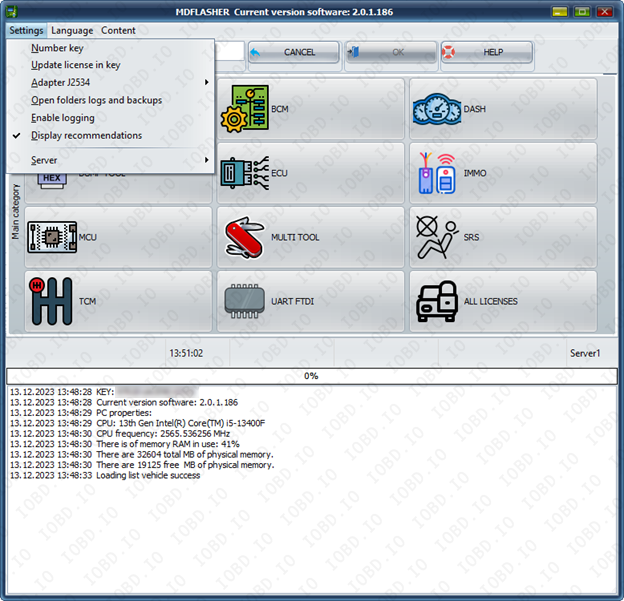
Click “OK” and click ok and your key number will be copied.

In the new version of MDflasher for Windows 10/11, an activation code is no longer required — the module activates online after restarting the program.
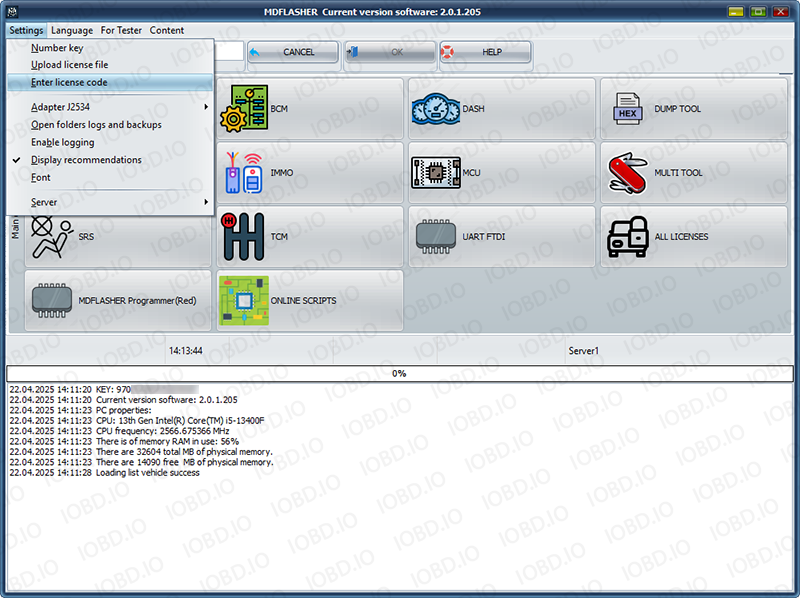
If you are using Windows 7 after receiving the activation code, click "Enter lecense code" and paste the activation code into the field. After that, restart the program.
1. No Refunds or Modifications for Digital Licenses
Activated modules or licenses cannot be returned or refunded.
If an incorrect key or device number is entered by the customer, the purchase is not eligible for return.
Licenses cannot be modified, transferred, or reissued for another device under any circumstances.
2. Irreversible Order Processing
After the order status changes to “Waiting for activation”, the data has already been sent to the developer.
From this point onward, the order cannot be canceled, edited, corrected, or refunded.
3. Responsibility for Software Functionality
Our store is not responsible for the functionality, performance, or declared features of any software module.
We do not guarantee the listed functions because we are not the developer.
4. Accuracy of Product Information
Module and script descriptions are provided directly by the manufacturer.
IOBD.io is not responsible for any inaccuracies, missing details, or differences between the description and actual operation.
In disputed situations regarding functionality or listed features, the customer must contact the manufacturer.
5. Customer Responsibility for Installation
IOBD.io sells professional automotive diagnostic software and equipment.
Installation, setup, configuration, and compatibility checks must be performed by the customer.
We do not provide remote installation, programming, or setup services unless explicitly stated otherwise.
6. Required Technical Knowledge
These products are intended for users with basic technical knowledge in automotive diagnostics.
The customer is fully responsible for understanding the installation process and using the software and hardware correctly.
7. No Liability for Incorrect Usage
IOBD.IO is not responsible for issues caused by:
incorrect installation
unsupported or incompatible hardware
improper configuration
third-party interference