Hurry to buy Promotion ends left
- Technical specifications of MDflasher modules
- MDflasher Support
- In the new version of MDflasher for Windows 10/11, an activation code is no longer required — the module activates online after restarting the program. If you are using Windows 7, please specify in the order comments that you need an activation code.
MDFlasher License 150 – NEC 78K0 UAZ AP UART (D78F0836) Instrument Cluster Programmer
MDFlasher License 150 is a specialized software module developed for the diagnostics, repair, and servicing of AP (Avtopribor) instrument clusters based on the NEC 78K0 (D78F0836 / uPD78F0836) microcontroller. Utilizing a direct UART interface, this module delivers a stable bench solution for automotive technicians and cluster repair specialists performing firmware recovery and mileage recalibration.
To activate the module you need a USB dongle MDflasher. When ordering, please indicate the Serial Number of the key.
Key Features & Capabilities
- FLASH Memory Writing: Fast and reliable direct programming of the NEC 78K0 MCU.
- FLASH Verification: Automatic post-write data verification for complete integrity.
- MCU Identification: Read complete hardware and software info from the target microcontroller.
- Firmware Recovery: Restore corrupted or non-responsive dashboard firmware using the built-in database.
- Mileage Recalibration: Precise odometer adjustment on supported instrument clusters
Supported Vehicles & Technical Details:
- Target Vehicle: UAZ Hunter (УАЗ Хантер)
- Instrument Cluster Manufacturer: AP (Avtopribor / Автоприбор)
- Target MCU: Renesas / NEC 78K0 D78F0836
- Supported Firmware Version: 85.3802
Hardware Requirements:
- Requires an official MDFlasher Programmer / UART Adapter
- Connection is carried out on the bench via dedicated UART pinout testpoints.
Important Notice:
Due to factory revisions and hardware updates throughout production runs, certain PCB hardware revisions and software versions may not be supported. Please verify board layout, MCU markings, and wiring compatibility prior to flashing.
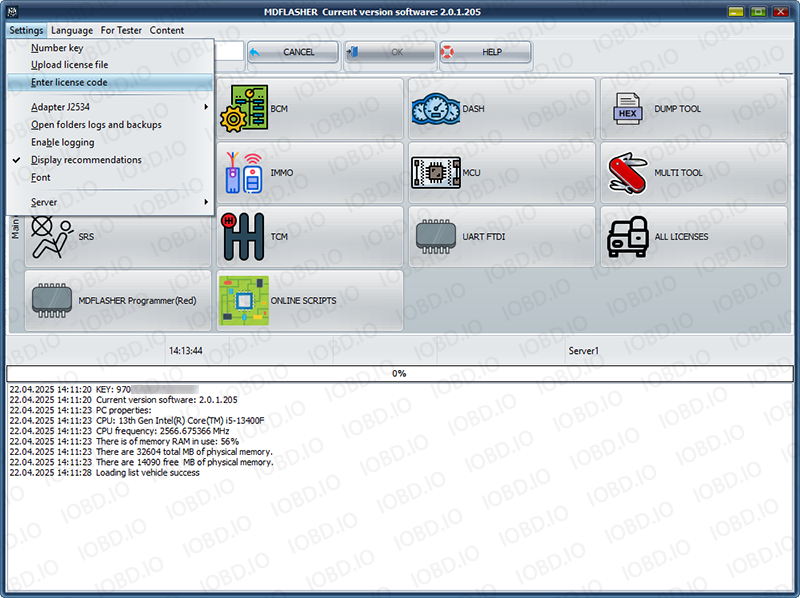
Open the program and click “Settings” -> “Number key”
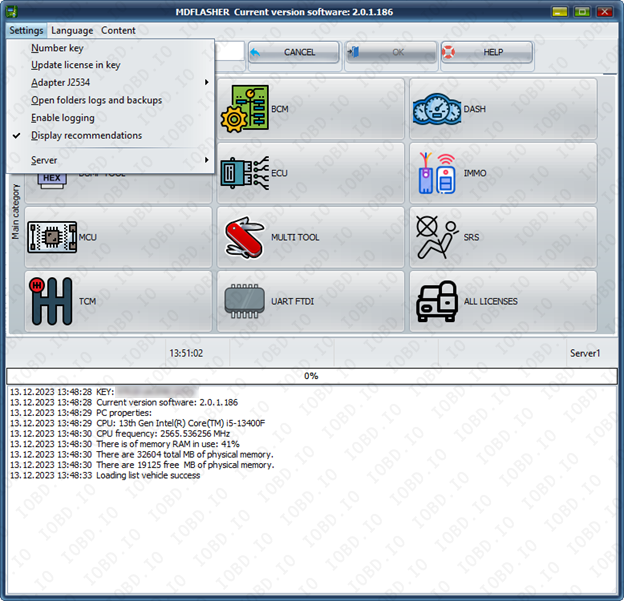
Click “OK” and click ok and your key number will be copied.

In the new version of MDflasher for Windows 10/11, an activation code is no longer required — the module activates online after restarting the program.
If you are using Windows 7 after receiving the activation code, click "Enter lecense code" and paste the activation code into the field. After that, restart the program.
1. No Refunds or Modifications for Digital Licenses
Activated modules or licenses cannot be returned or refunded.
If an incorrect key or device number is entered by the customer, the purchase is not eligible for return.
Licenses cannot be modified, transferred, or reissued for another device under any circumstances.
2. Irreversible Order Processing
After the order status changes to “Waiting for activation”, the data has already been sent to the developer.
From this point onward, the order cannot be canceled, edited, corrected, or refunded.
3. Responsibility for Software Functionality
Our store is not responsible for the functionality, performance, or declared features of any software module.
We do not guarantee the listed functions because we are not the developer.
4. Accuracy of Product Information
Module and script descriptions are provided directly by the manufacturer.
IOBD.io is not responsible for any inaccuracies, missing details, or differences between the description and actual operation.
In disputed situations regarding functionality or listed features, the customer must contact the manufacturer.
5. Customer Responsibility for Installation
IOBD.io sells professional automotive diagnostic software and equipment.
Installation, setup, configuration, and compatibility checks must be performed by the customer.
We do not provide remote installation, programming, or setup services unless explicitly stated otherwise.
6. Required Technical Knowledge
These products are intended for users with basic technical knowledge in automotive diagnostics.
The customer is fully responsible for understanding the installation process and using the software and hardware correctly.
7. No Liability for Incorrect Usage
IOBD.IO is not responsible for issues caused by:
incorrect installation
unsupported or incompatible hardware
improper configuration
third-party interference