

EXT License UCDS – Extended License for Universal CAN Diagnostic System
The EXT License is an extended license for the UCDS software project that grants access to the following key features.
Key features EXT license:
- VBF Loader. The VBF Loader section allows users to independently load .VBF files into various modules of Ford vehicles. This tool is essential for updating and configuring control units.
- Update Wizard. Update Wizard enables the updating of Ford vehicle module software using the latest IDS database files.
- Note: Not all modules can be updated through this section. In some cases, update files may be unavailable due to security policies or because the module supports alternative update methods (e.g., via USB or SD card).
- Direct Config. The Direct Config section provides direct configuration of Ford vehicle modules. This feature is especially important for Ford Mondeo 5 and newer models, as these can only be configured using this section.
License Activation:
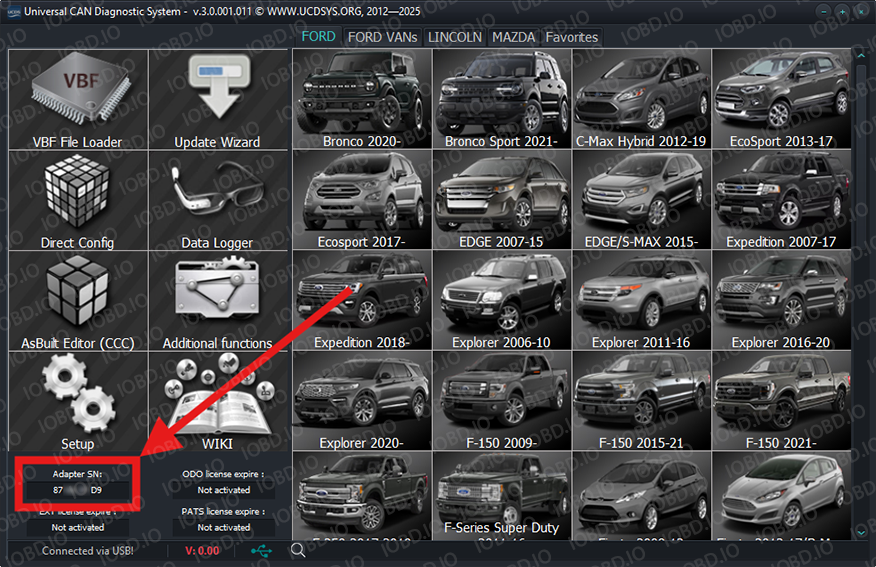
- To activate the license, please write UCDS V5 serial number in the order. After activation, you will receive an email confirming that your order has been completed.
- Please close the UCDS software and restart it as administrator to ensure the license is properly activated.
The UCDS v5 serial number is located in the lower left corner of the program.
1. No Refunds or Modifications for Digital Licenses
Activated modules or licenses cannot be returned or refunded.
If an incorrect key or device number is entered by the customer, the purchase is not eligible for return.
Licenses cannot be modified, transferred, or reissued for another device under any circumstances.
2. Irreversible Order Processing
After the order status changes to “Waiting for activation”, the data has already been sent to the developer.
From this point onward, the order cannot be canceled, edited, corrected, or refunded.
3. Responsibility for Software Functionality
Our store is not responsible for the functionality, performance, or declared features of any software module.
We do not guarantee the listed functions because we are not the developer.
4. Accuracy of Product Information
Module and script descriptions are provided directly by the manufacturer.
IOBD.io is not responsible for any inaccuracies, missing details, or differences between the description and actual operation.
In disputed situations regarding functionality or listed features, the customer must contact the manufacturer.
5. Customer Responsibility for Installation
IOBD.io sells professional automotive diagnostic software and equipment.
Installation, setup, configuration, and compatibility checks must be performed by the customer.
We do not provide remote installation, programming, or setup services unless explicitly stated otherwise.
6. Required Technical Knowledge
These products are intended for users with basic technical knowledge in automotive diagnostics.
The customer is fully responsible for understanding the installation process and using the software and hardware correctly.
7. No Liability for Incorrect Usage
IOBD.IO is not responsible for issues caused by:
incorrect installation
unsupported or incompatible hardware
improper configuration
third-party interference