
- Scripts work only with original devices iProg Pro
-
Processing Time: From a few hours up to several days.
Scripts are created individually by different third-party developers, so fulfillment speed depends directly on their current workload.
ECU Configuration Reset Script (Toyota / Lexus Gen3) for iProg Pro
Toyota & Lexus Gen3 ECU Configuration Reset Script for original iProg Pro programmer. This script allows you to reset vehicle configuration / option coding directly in Engine Control Units (ECU) via OBD2 / CAN bus without removing or opening the module.
Designed specifically for modern EEPROM-less Gen3 Engine Control Units where configuration data is stored inside the main MCU flash memory
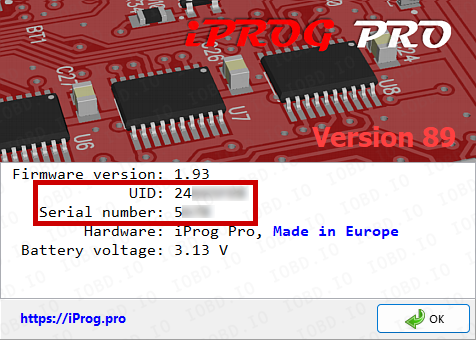
The script only works with original iProg Pro programmer! Please write Serial Number and UID in the order.
Key Features & Benefits
- OBD2 / CAN-Bus Operation: Fast and safe reset through the vehicle diagnostic port — no ECU removal, bench wiring, or opening required.
- Solves System Conflict Issues: Resolves dashboard errors and feature mismatches after instrument cluster adaptations or configuration resets.
- Fixes Cruise Control & ADAS Errors: Automatically restores standard Cruise Control functionality and clears option conflict DTCs when swapping or reconfiguring instrument clusters (e.g., after using the Dashboard Reset Script).
- Gen3 EEPROM-less Support: Specifically engineered for modern Toyota/Lexus Gen3 engine control modules.
How It Works (Application Example)
When performing a configuration reset on a Toyota/Lexus instrument cluster, systems like Adaptive/Active Cruise Control (ACC) may stop functioning properly, causing configuration mismatch errors on the dashboard.
Running this script resets the Engine Control Unit configuration, allowing it to sync correctly with standard Cruise Control and other vehicle systems, eliminating option code conflicts.
Tested & Supported ECUs
This script has been tested and verified on the following Toyota / Lexus Gen3 ECUs:
- 89661-0RC20 — Toyota RAV4 (2022)
- 89661-0EG22 — Toyota Highlander (2022)
- Toyota Camry XV70 (Gen3 ECUs)
(List is continuously expanded with software updates).
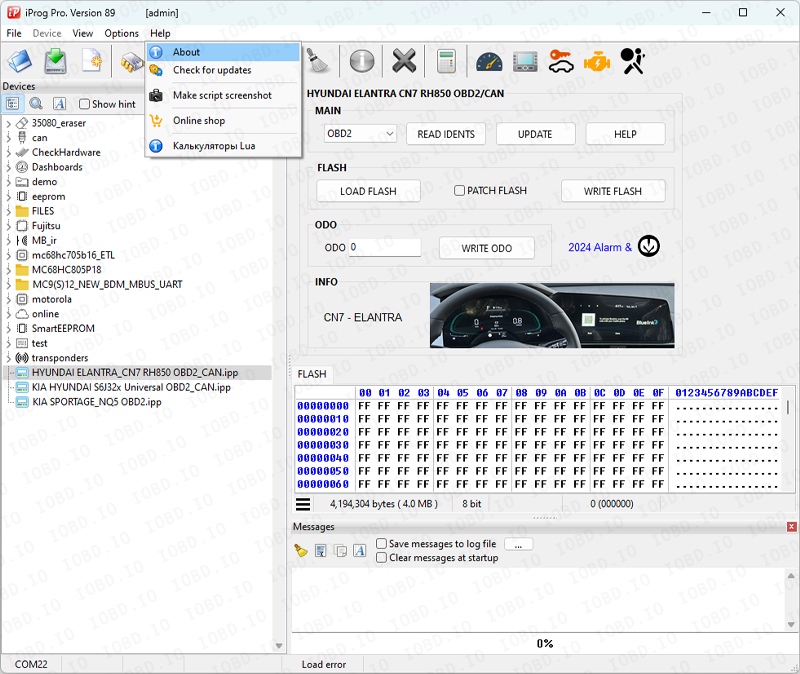
Open the program and click “Help” -> “About”.
Copy data from the program when placing an order
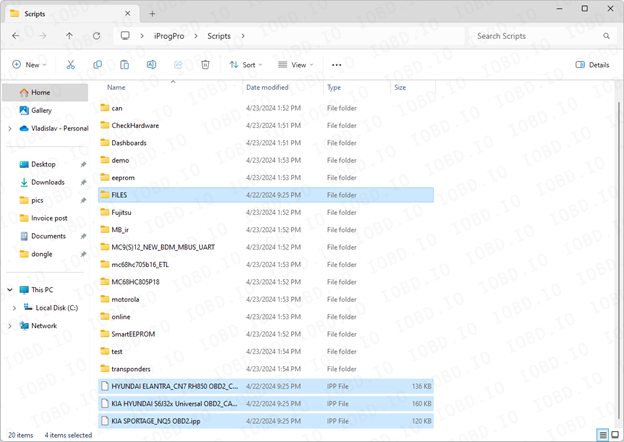
After completing the order, you will receive files, they must be added to the Scripts folder..
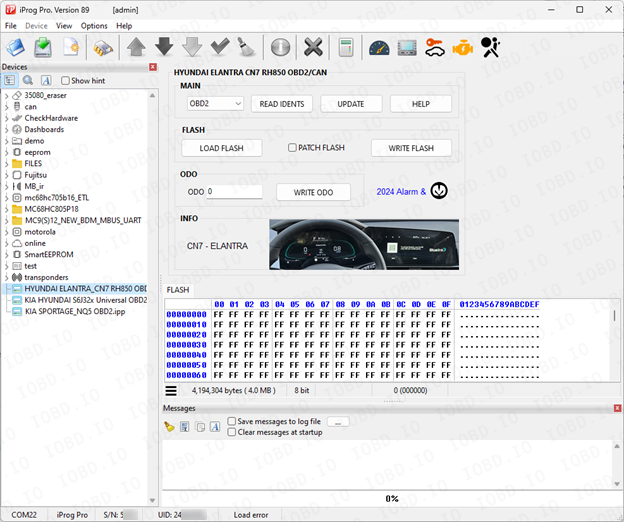
Launch the program and on the left side of the screen you will see the added scripts.
1. No Refunds or Modifications for Digital Licenses
Activated modules or licenses cannot be returned or refunded.
If an incorrect key or device number is entered by the customer, the purchase is not eligible for return.
Licenses cannot be modified, transferred, or reissued for another device under any circumstances.
2. Irreversible Order Processing
After the order status changes to “Waiting for activation”, the data has already been sent to the developer.
From this point onward, the order cannot be canceled, edited, corrected, or refunded.
3. Responsibility for Software Functionality
Our store is not responsible for the functionality, performance, or declared features of any software module.
We do not guarantee the listed functions because we are not the developer.
4. Accuracy of Product Information
Module and script descriptions are provided directly by the manufacturer.
IOBD.io is not responsible for any inaccuracies, missing details, or differences between the description and actual operation.
In disputed situations regarding functionality or listed features, the customer must contact the manufacturer.
5. Customer Responsibility for Installation
IOBD.io sells professional automotive diagnostic software and equipment.
Installation, setup, configuration, and compatibility checks must be performed by the customer.
We do not provide remote installation, programming, or setup services unless explicitly stated otherwise.
6. Required Technical Knowledge
These products are intended for users with basic technical knowledge in automotive diagnostics.
The customer is fully responsible for understanding the installation process and using the software and hardware correctly.
7. No Liability for Incorrect Usage
IOBD.IO is not responsible for issues caused by:
incorrect installation
unsupported or incompatible hardware
improper configuration
third-party interference