
- Technical specifications of MDflasher modules
- MDflasher Support
- In the new version of MDflasher for Windows 10/11, an activation code is no longer required — the module activates online after restarting the program. If you are using Windows 7, please specify in the order comments that you need an activation code.
GM ACDelco Generation 1/2 ECU BENCH/OBDII.
The module allows you to work through the OBDII connector via the CAN bus with ACDelco Gen1 (first generation ECU - 2 Byte SeedKey) and ACDelco Gen2 (second generation ECU - 5 Byte SeedKey) control units, which were installed on GM vehicles.
Working with the module is completely safe. In case of loss of connection during writing, for example, if the laptop battery or the car battery dies, simply repeat the writing procedure and the functionality will be restored.
The reading/writing procedure takes from 2 to 10 minutes, depending on the type of ECU and the adapter used.
Supported functions:
- ECU identification
- Reading/deleting fault codes
- Reading Full Flash processor/writing calibration area
Supported ECU types (without checksum calculation):
- GM ACDelco E37 Motorola MPC561
- GM ACDelco E38 Motorola MPC561
- GM ACDelco E39 Motorola MPC5566
- GM ACDelco E39A Motorola MPC5566
- GM ACDelco E67 Motorola MPC561
- GM ACDelco E78 Motorola MPC5566
- GM ACDelco E80 Motorola MPC5676
- GM ACDelco E83 Motorola MPC5565
- GM ACDelco E87 Motorola MPC5565
Not all software versions may be supported.
To use the module, you need to purchase a USB protection key. You can activate an unlimited number of modules with one key. To activate new modules, you need to provide the serial number of your key.
Open the program and click “Settings” -> “Number key”
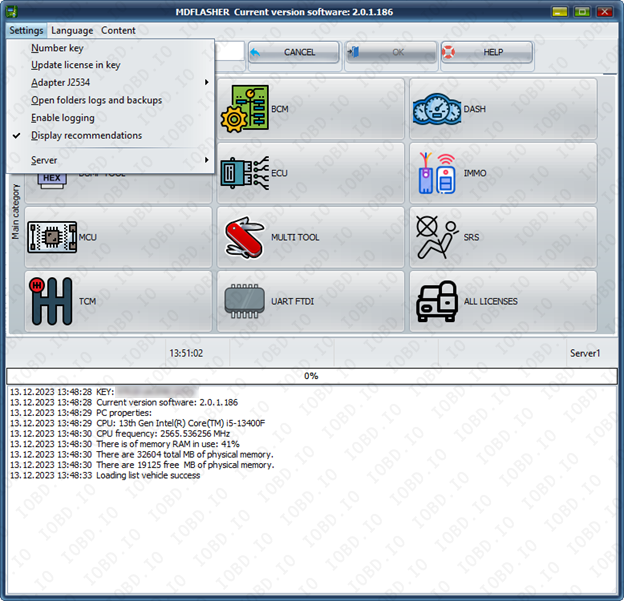
Click “OK” and click ok and your key number will be copied.

In the new version of MDflasher for Windows 10/11, an activation code is no longer required — the module activates online after restarting the program.
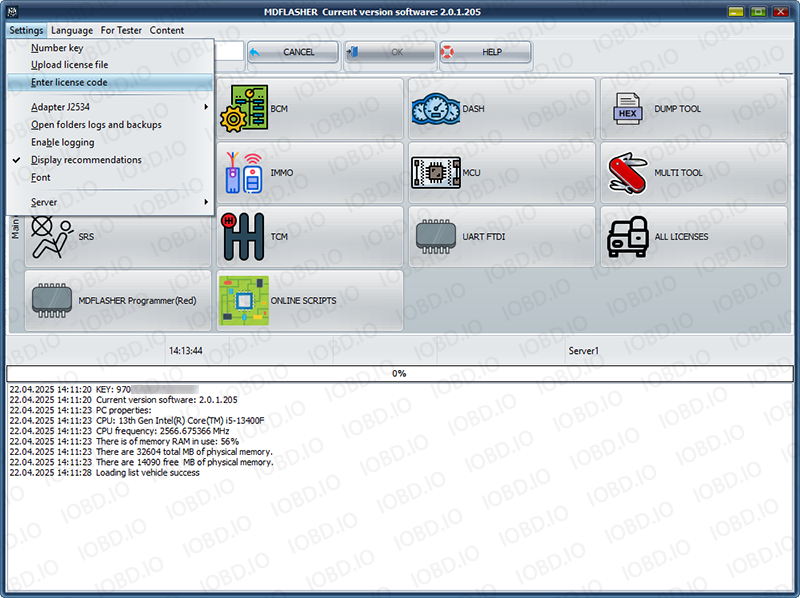
If you are using Windows 7 after receiving the activation code, click "Enter lecense code" and paste the activation code into the field. After that, restart the program.
1. No Refunds or Modifications for Digital Licenses
Activated modules or licenses cannot be returned or refunded.
If an incorrect key or device number is entered by the customer, the purchase is not eligible for return.
Licenses cannot be modified, transferred, or reissued for another device under any circumstances.
2. Irreversible Order Processing
After the order status changes to “Waiting for activation”, the data has already been sent to the developer.
From this point onward, the order cannot be canceled, edited, corrected, or refunded.
3. Responsibility for Software Functionality
Our store is not responsible for the functionality, performance, or declared features of any software module.
We do not guarantee the listed functions because we are not the developer.
4. Accuracy of Product Information
Module and script descriptions are provided directly by the manufacturer.
IOBD.io is not responsible for any inaccuracies, missing details, or differences between the description and actual operation.
In disputed situations regarding functionality or listed features, the customer must contact the manufacturer.
5. Customer Responsibility for Installation
IOBD.io sells professional automotive diagnostic software and equipment.
Installation, setup, configuration, and compatibility checks must be performed by the customer.
We do not provide remote installation, programming, or setup services unless explicitly stated otherwise.
6. Required Technical Knowledge
These products are intended for users with basic technical knowledge in automotive diagnostics.
The customer is fully responsible for understanding the installation process and using the software and hardware correctly.
7. No Liability for Incorrect Usage
IOBD.IO is not responsible for issues caused by:
incorrect installation
unsupported or incompatible hardware
improper configuration
third-party interference